When the World Stopped Emailing: Inside the Massive Microsoft Outlook and 365 Outage
A dormant July code bug, routine server maintenance, and an automated traffic stampede combined to knock Microsoft Outlook and 365 offline worldwide for over 24 hours. Here is the full technical breakdown of what broke inside Microsoft's network, the global fallout, and the architectural fixes enterprise leaders are demanding next
How a four-month-old dormant bug, routine maintenance, and a stampede of automated traffic took down global enterprise operations for over 24 hours.
For roughly 24 hours between November 12 and November 14, 2026, millions of knowledge workers were handed the ultimate excuse to stop answering emails. Unfortunately for IT administrators, courts, hospitals, and governments across more than 70 countries, the punchline wore thin within the first twenty minutes.
What started on Thursday afternoon as a regional hiccup in the Americas quickly cascaded into a full-blown global blackout across Microsoft 365, paralyzing Outlook, Exchange Online, Microsoft Teams, SharePoint, OneDrive, and Copilot. Worse still, because Microsoft was forced to clarify multiple times that the meltdown had nothing to do with hackers or rogue AI agents, users were left realizing a much less cinematic truth: Microsoft simply broke its own network and could not turn it back on.
What Actually Happened: A Perfect Storm of Three Failures
In an executive post-mortem shared by Charles Lamanna, Microsoft’s Executive Vice President of Copilot, Agents, and Platform, the company admitted that no single tripwire brought down its cloud. Instead, the outage was triggered by three intersecting operational failures occurring right during peak U.S. traffic hours:
-
1. The Dormant July Bug: A latent software defect had been quietly sitting inside Microsoft’s networking gateway servers since a capacity upgrade in July 2026. It passed every standard automated test because it only manifested under very specific, extreme server load conditions, causing the process that establishes secure connections to lock up and stop responding.
-
2. Routine Maintenance Shrunk the Safety Net: When the incident began on November 12 (between 17:00 and 18:00 UTC), Microsoft was performing routine maintenance on its networking gateway fleet, temporarily taking 14 percent of its total server capacity offline.
-
3. A Network Traffic Shift Pulled the Pin: Simultaneously, a change in traffic allocation across Microsoft’s network fabric pushed higher connection volumes onto the remaining gateway hosts. The combination of reduced server capacity and elevated traffic hit the exact threshold needed to wake up the dormant July bug.
Once the bug triggered, Microsoft's own automated failover protections actively made the disaster worse. As gateway servers froze and failed health checks, automated traffic routing shifted their workload onto the remaining healthy servers. That extra load immediately triggered the exact same July bug on the surviving hosts. At the peak of the cascade, more than 80 percent of Microsoft’s networking gateway servers worldwide were completely unresponsive.
Why Recovery Took So Long (And Why Outlook Suffered Most)
In a normal cloud incident, engineers simply hit the big red rollback button or flip a feature flag to revert a bad deployment. Because this defect had been baked into the production codebase since July, automated rollback mechanisms were useless. Microsoft engineers had to write, test, and deploy a fresh code patch on the fly while the house was on fire.
Even after the patch was ready, two architectural traps turned recovery into an overnight slog:
-
Exchange Online Was Stuck on Primary Gateways: While Microsoft successfully shifted traffic for Teams, SharePoint, and OneDrive over to secondary networking gateway clusters within a few hours, Exchange Online (the backbone of Outlook) was architecturally tethered to the primary gateway group. Outlook had nowhere to evacuate.
-
The "Thundering Herd" Stampede: Every time engineers patched and rebooted a block of unresponsive servers, millions of waiting Outlook clients and queued emails immediately slammed the freshly booted hosts. The stampede of backlogged traffic instantly overwhelmed the servers and knocked them offline again. Microsoft eventually had to disable automated traffic routing entirely, rebooting servers in massive batches (sometimes over half a region at once) before slowly trickling traffic back in.
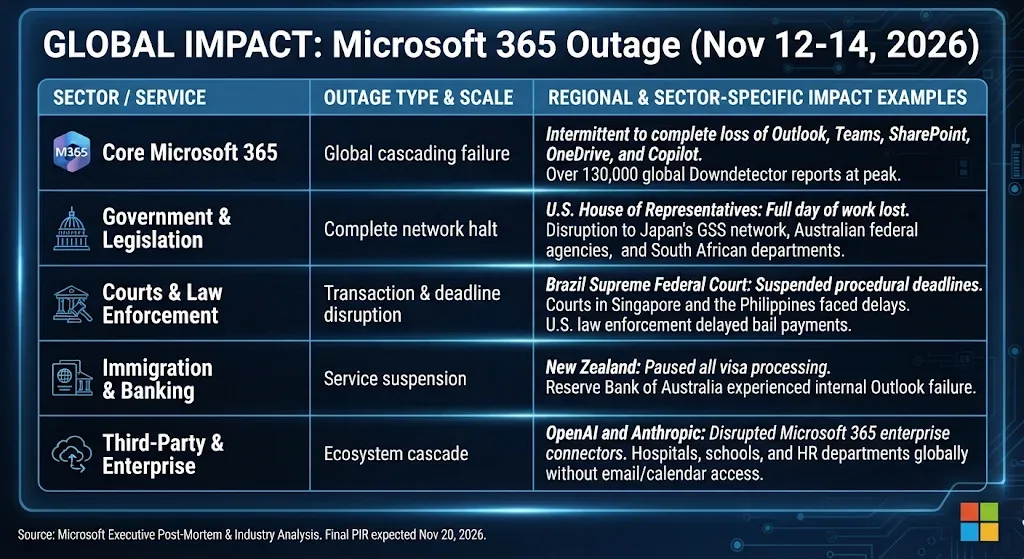
The Global Blast Radius
With more than 450 million commercial Microsoft 365 subscriptions globally, the fallout extended far beyond quiet corporate chat channels.
 ## What Microsoft Must Improve
Both CEO Satya Nadella and EVP Charles Lamanna have issued formal apologies, and Microsoft is scheduled to release its comprehensive final Post-Incident Report (PIR) on November 20. While Microsoft temporarily extended its email delivery timeout window to 48 hours to prevent bounced messages during the backlog recovery, enterprise customers and government regulators are demanding deep structural fixes, especially given that a separate core authentication outage hit Microsoft 365 just weeks earlier on August 31.
Going forward, Microsoft is expected to overhaul four critical areas of its cloud resilience:
- Enforcing True Blast-Radius Isolation ("Capacity Units"): Microsoft uses a management abstraction called "capacity units" designed to compartmentalize infrastructure and keep regional failures from going global. During this outage, those barriers failed completely, allowing a traffic spike in one window to cascade across every region on Earth within 30 minutes. Microsoft must rebuild hard regional circuit breakers so an automated failover cannot domino across the entire global fleet.
Decoupling Exchange Online from Single Gateway Groups: The fact that Teams and SharePoint could fail over to secondary networking gateway instances while Exchange Online remained stranded on the primary cluster exposed a glaring single point of failure. Microsoft is expected to re-architect Exchange Online’s gateway routing, so email traffic can dynamically evacuate to secondary pathways.
-
Smarter Cold-Start Throttling and Backpressure Controls: Having to manually disable automated traffic routing because recovering servers were immediately crushed by waiting client requests highlights a major gap in cold-start protection. Microsoft must implement automated backpressure and staged warm-up throttling at the network edge so recovering clusters are shielded from "thundering herd" reconnection storms.
-
Chaos Testing Under Degraded Maintenance States: The July bug hid for four months because pre-deployment testing evaluated normal capacity rather than stress-testing a fleet running at 86 percent capacity during maintenance while absorbing a fabric traffic shift. Microsoft’s defense-in-depth roadmap will require aggressive chaos engineering that simulates compound load spikes before gateway code ever reaches production.
Get the Intelligence Brief
Breaches, CVEs and IAM news in one email, as often as you choose.
By subscribing you agree to receive email from Paulo Barrilli, publisher of Identity at the Core. You can withdraw consent at any time with the unsubscribe link in every email, or by writing to contact@identityatcore.org.
Be the first to comment
Members only: sign up if you have something worth saying.
Want to weigh in? Sign in or create a free account.
No comments yet.